 Save to Photos
iPhone app by Frozen Duck Technologies LLC
Save to Photos
iPhone app by Frozen Duck Technologies LLC
Google Photos album, into your Photos library
Their shared album, in your own photos
Someone shares a Google Photos album with you — a wedding, a school trip, a weekend with friends — and the photos sit in an app that is not yours, behind a link you have to remember to open. Save to Photos reads that shared album and writes it straight into your iPhone's Photos library, then saves whatever gets added to it later, without ever saving the same photo twice.

Requires iOS 16 or later. Free to use, with no cap on albums or photos. The App Store listing opens when Apple approves the first release.
What it does
A shared Google Photos album is a link, not photos you own. Open it and the pictures live in Google's app: they are not in your camera roll, they are not in your iCloud backup, and they disappear from your life the day you lose the link. Save to Photos closes that gap.
- Saves a shared album into Apple Photos. Pick an album on your iPhone as the destination, or the camera roll.
- Keeps saving what is added later. Whoever owns the album adds twenty more photos next weekend; those get saved too.
- Never saves the same photo twice, even when two shared albums contain it and both go to the same place.
- Videos as well as photos, at the largest size the link exposes.
- No Google sign-in, ever. No password, no OAuth, no account of any kind. The shared link is the only access it needs.
- Several albums at once, each with its own destination and its own rule about what to take.
Adding an album takes one tap in Google Photos
There is nothing to sign up for and nothing to paste, if you do not want to. Open the shared album in Google Photos, tap Share, and pick Save to Photos. This is the whole of it, recorded on a real phone:
If the link arrived some other way — a message, an email, a QR code on somebody else's screen — the Add Album screen also takes Paste Link, Type a Link and Scan QR Code.
One screen per album, and it tells you the truth
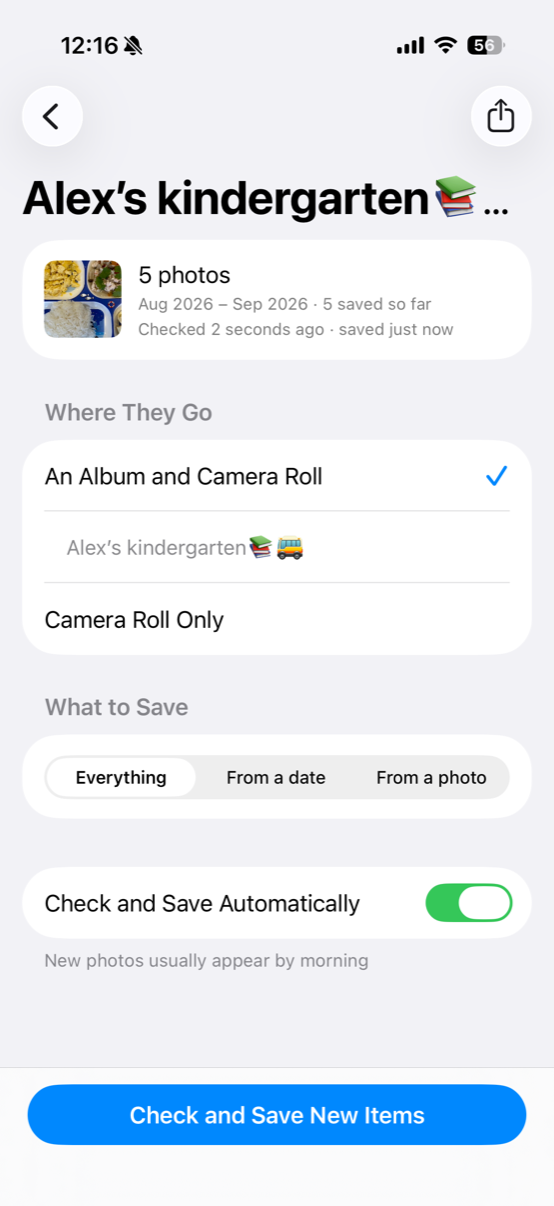
- Where they go — an album of your own plus the camera roll, or the camera roll only.
- What to save — everything in the album, or only what came after a date or after a photo you point at.
- Check and Save New Items — the button that does the work, free and unlimited.
Your photos and links stay yours
The app has no server, so there is nowhere for your photos or your album links to go. Photos are downloaded from Google straight into your Photos library. Each album's link is kept in the iPhone's Keychain and synced only through your own iCloud Keychain, which is end-to-end encrypted. There is no analytics service, no advertising network and no data broker in the app.
The full detail, including the anonymous technical information it sends to Apple, is in the privacy policy.
What it costs
Free, with no cap. Every album, every photo, every video, the duplicate skipping, the share sheet, the QR scanning, and tapping Check and Save New Items whenever you like.
Automatic — $1.99 a month or $14.99 a year, with a seven-day free trial on the yearly plan. It lets the app check by itself while your iPhone is charging, usually overnight, catch up when you open it, and tell you when photos have arrived. iOS decides whether an app in the background gets to run, so charging is the condition rather than a promised schedule. If the subscription lapses, nothing is locked and no album goes quiet: you go back to tapping the button.